


DVB-T Driver
4.52.00 Reviews
App Specs
- Version
- 1.44
- Updated On
- License
- Free
- Downloads
- 100,000+
- Developer
- Signalware Ltd
- Categories
- Libraries & Demo
- Platform
- Android
Screenshots
 Analysis by AppCompare
DVB-T Driver is one of those hidden gems in the app world that can truly transform the way you experience digital TV on your Android device. If you’re someone who loves watching TV on the go, or simply enjoys having more control over how you access media, then this app might just be your new best friend. Let’s dive into what makes this app tick.
Turning Your Device into a TV: How It Works
So, you might be wondering, what exactly does the DVB-T Driver do? Essentially, it allows your Android device to function as a digital TV receiver. Yeah, you read that right! With this app, you can access and watch digital television directly from your device.
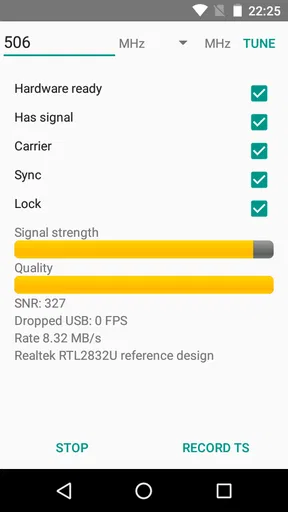
The magic happens through a USB dongle that you connect to your phone or tablet. Once connected, the app kicks into gear, scanning for available channels and bringing them right to your screen. It’s like carrying a portable TV in your pocket, without the hassle of extra equipment or complicated setups.
Setting Up: Easier Than You Think
Getting started with the DVB-T Driver is surprisingly straightforward. First, you’ll need a compatible USB tuner. Don’t worry; the app provides a list of supported devices to make sure you’re on the right track.
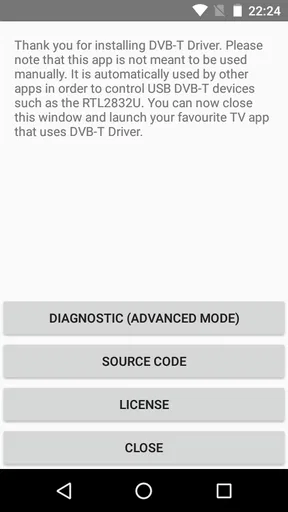
Once you have your hardware ready, simply plug it into your device, open the app, and let it do its thing. The interface is user-friendly, guiding you through each step with clear instructions. It’s a breeze, even if you’re not particularly tech-savvy.
Features That Make It Stand Out
One of the coolest features is the ability to record live TV. You can easily schedule recordings, ensuring you never miss your favorite shows. Plus, the playback quality is top-notch, providing a seamless viewing experience.
Another highlight is the electronic program guide (EPG), which gives you detailed information about current and upcoming shows. It’s like having a TV guide right at your fingertips, making it easy to plan your viewing schedule.
Worth Reading Before You Choose

EA SPORTS FC Mobile 26 Is a Bigger Football Game, but It Takes Time

Flipboard Shows What News Apps Must Do Beyond the Feed

Switching to Android Auto Means Rethinking Your Driving Routine

Google Calendar Makes a Crowded Week Easier to Manage

Ludo King Makes the Most of the Minutes Between Plans

Baby Panda World Brings Quick Play to Modern Phones, but Its Game Library Feels Busy
And let’s not forget about the app’s versatility. It supports a wide range of formats and resolutions, so whether you’re watching on a smartphone or a tablet, you’re guaranteed a crisp, clear picture.
Performance and Reliability
In terms of performance, the DVB-T Driver holds up remarkably well. The app is stable, with minimal buffering or lag, even when switching between channels. It’s designed to optimize performance, ensuring a smooth viewing experience.
Reliability is key, and this app delivers. Once you’ve set it up, it works consistently, providing access to digital TV whenever you need it. It’s a reliable companion for those who rely on their devices for entertainment on the go.
Final Thoughts: Is It Worth It?
So, is the DVB-T Driver worth downloading? Absolutely! It’s a fantastic solution for anyone looking to enhance their digital TV experience. Whether you’re at home or traveling, this app ensures you’ll always have access to your favorite shows.
Overall, the app is well-designed, easy to use, and packed with features that make watching TV on your device a pleasure. If you’re ready to turn your Android device into a portable TV, give the DVB-T Driver a try. You’ll wonder how you ever lived without it!
Pros
- Supports a wide range of DVB-T devices.
- Easy setup with user-friendly interface.
- Offers real-time TV streaming capabilities.
- Low power consumption for prolonged use.
- Compatible with both Android and iOS platforms.
Cons
- Limited to certain geographical regions.
- Can experience occasional signal drops.
- Requires external antenna for optimal use.
- Interface lacks advanced customization.
- May not support all DVB-T2 devices.
FAQs for DVB-T Driver
What is DVB-T Driver and what does it do?
DVB-T Driver is an application designed to enable TV tuner functionality on your Android device. It allows users to watch digital television channels directly on their smartphones or tablets, provided they have a compatible USB TV tuner. It's particularly useful for those who want to enjoy live TV without the need for internet connectivity.
Is DVB-T Driver compatible with all Android devices?
Not all Android devices are compatible with DVB-T Driver. It requires a device that supports USB OTG (On-The-Go) functionality to connect with a USB TV tuner. Additionally, the app's performance may vary based on the device's hardware capabilities, so checking the app's compatibility with your specific device model is recommended.
Do I need an internet connection to use DVB-T Driver?
No, DVB-T Driver does not require an internet connection to function. The app works by connecting your Android device to a USB TV tuner, allowing you to receive over-the-air digital TV signals. This makes it a great option for watching TV in areas with limited internet access.
What types of channels can I watch with DVB-T Driver?
With DVB-T Driver, you can watch free-to-air digital television channels, depending on your location and the strength of the broadcast signal. The availability and quality of channels will vary based on your geographic location and the capabilities of your TV tuner hardware.
Are there any additional costs to use DVB-T Driver?
The app itself may be free or require a one-time purchase, depending on the version. However, you will need to invest in a compatible USB TV tuner to use the app effectively. There are no recurring subscription fees, making it a cost-effective option for accessing digital TV on-the-go.


